

The ChatGPT product feed is a catalog file in OpenAI’s product schema: one row per item or variant, nine required fields, prices written as 79.99 USD and an availability value from a fixed list. Merchants approved for organic discovery push it to OpenAI over SFTP as a full snapshot at least once a day. ChatGPT Ads product campaigns use the same schema, uploaded as a CSV to an ad account feed.
As of October 27, 2026. Every rule below links to OpenAI’s documentation, which changes often; check it before you build an export.
| Question | Organic discovery feed | ChatGPT Ads product feed |
|---|---|---|
| What it does | Products in ChatGPT’s organic shopping answers | Labeled product ads built from your catalog |
| Who gets access | Approved partners, apply at chatgpt.com/merchants | Advertisers with an ad account and feed access |
| How it arrives | SFTP push of full snapshots | CSV over SFTP, Hosted URL in Ads Manager, Delta API for changes |
| Formats | parquet (preferred), jsonl.gz, csv.gz, tsv.gz | UTF-8 CSV in the walkthrough |
| Refresh | Full snapshot at least daily | Full uploads plus Delta API updates |
| Schema | OpenAI product feed reference | The same reference, plus is_ads_eligible |
The nine required fields
OpenAI’s feed reference marks nine attributes as required in every row: item_id, title, description, url, brand, seller_name, image_url, availability and price. It tells you to “start with discovery data, then add the fields required for your Ads or checkout integration”. Source: OpenAI, product feed reference
| Field | Rule in the reference | Where stores usually get it |
|---|---|---|
item_id | Stable, unique per item or variant, never reused | SKU or the platform’s product or variation ID |
title | At most 150 characters | Product name |
description | Plain text, aim for at most 5,000 characters | Long description with HTML removed |
url | Stable product page, absolute HTTP or HTTPS URL | Product permalink, variant URL if you have one |
brand | A real brand, not a placeholder | Shopify vendor, PrestaShop brand, a WooCommerce brand attribute or taxonomy |
seller_name | The actual seller | Your store or company name |
image_url | Direct image URL, such as a JPEG or PNG | Main product or variant image |
availability | in_stock, out_of_stock, pre_order, backorder or unknown | Mapped from the platform’s stock status |
price | Amount in major units, a space, ISO 4217 code | Regular price, sale price goes in sale_price |
Price is the field most exports get wrong. The reference wants a decimal point, no thousands separators and an uppercase currency code, and it warns against rounding a price into a different payable amount:
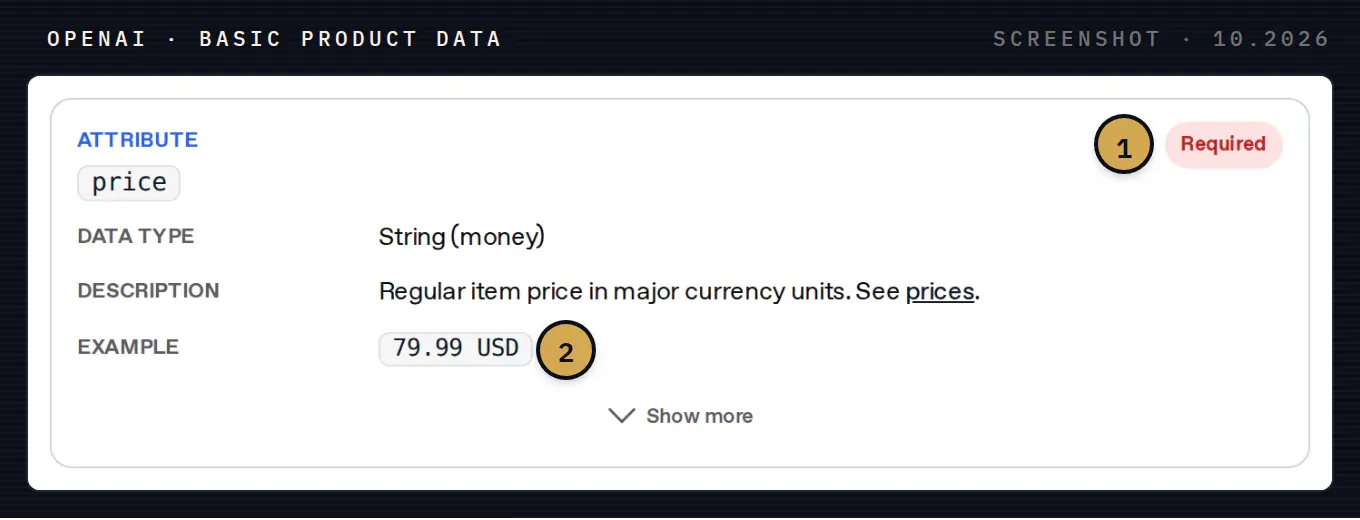
The price field in the reference. 1 Required in every row. 2 The format: 79.99 USD, with a dot, no thousands separator and the currency code after a space. A sale price goes in sale_price, which must be lower than price and in the same currency.
Two smaller rules reject rows in practice. An empty or unrecognized availability value rejects the row. And for optional fields, OpenAI asks you to omit an unknown value instead of sending placeholder strings such as null, unknown or n/a, except where the reference lists them as allowed. Source: OpenAI, product feed reference
Variants: one row per selection
A T-shirt in three sizes is three rows. Each row has its own item_id, price, availability, URL and images, and all three share a group_id for the parent listing. Every variant row also sets listing_has_variations to true and carries a variant_dict such as {"color":"Black","size":"10"}. Source: OpenAI, product feed reference
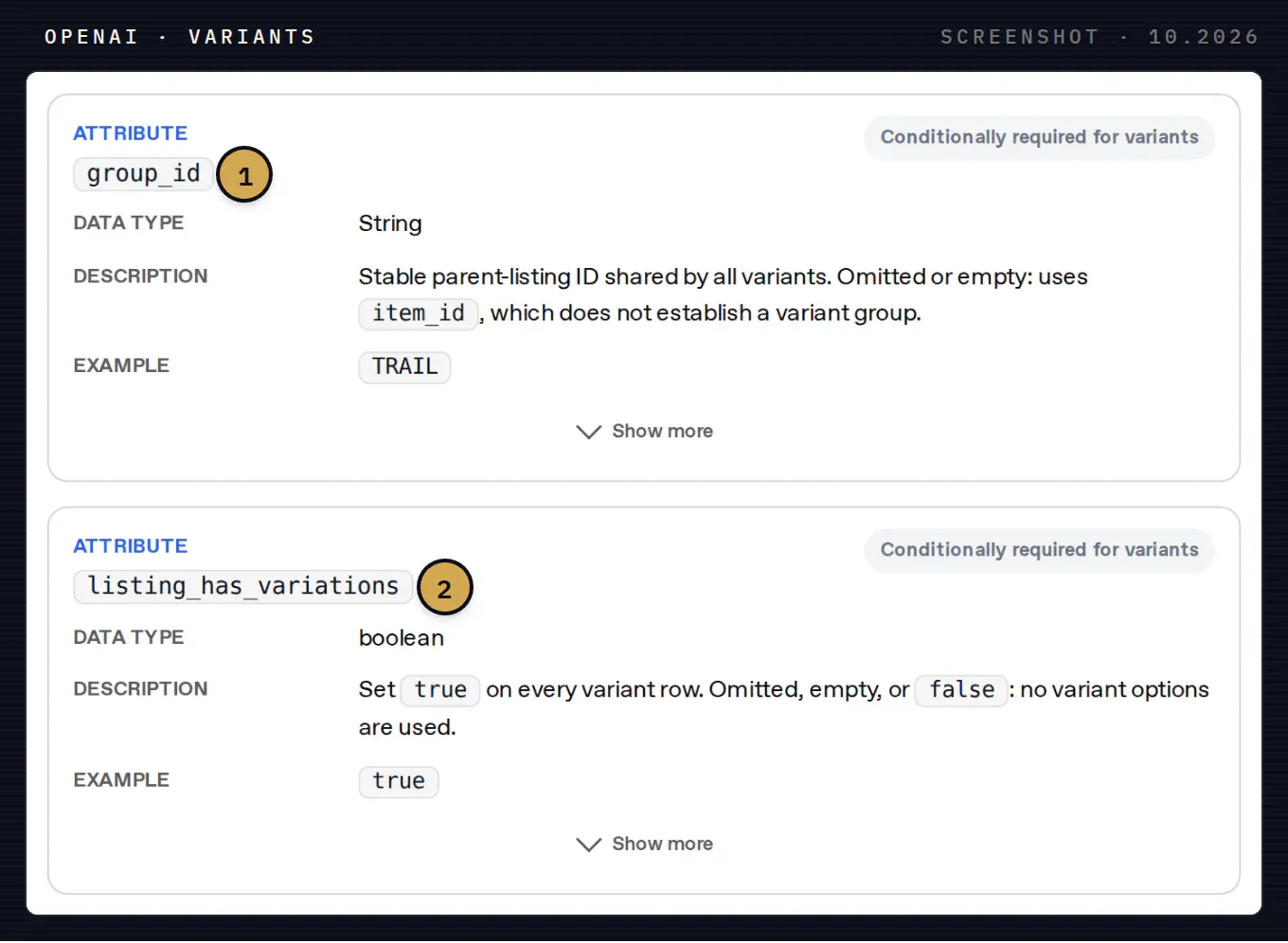
Variant fields in the reference. 1 group_id is the parent listing shared by all variants. If it is empty, OpenAI falls back to item_id and no variant group exists. 2 listing_has_variations must be true on every variant row, or the options are ignored.
The reference adds that the group ID must differ from each item ID and that the IDs should stay the same when price, stock, title or images change. In WooCommerce terms: the variable product’s ID or SKU is the group_id, each variation’s SKU is the item_id. A store that regenerates SKUs during a migration breaks the history OpenAI has for every product.
Optional fields worth sending
Beyond the nine, the reference groups optional attributes into item information, media, price and promotions, merchant info, fulfillment, returns, reviews, geo tagging, ads and checkout. The ones that help matching most are the ones a shopper asks about:
- Identifiers:
gtinwith exactly 8, 12, 13 or 14 digits and a valid check digit, leading zeros kept;mpntogether with the brand. OpenAI asks you not to invent an MPN to replace a missing GTIN. - Item details:
condition,product_categorywritten from broad to specific with>,color,size,material,gender,age_group, dimensions and weight with units. - Commercial terms:
sale_price,shipping_price,accepts_returns,return_deadline_in_daysand areturn_policyURL. - Reviews:
star_ratingon a 0 to 5 scale, always paired with a positivereview_count.
Each row also carries OpenAI flags. is_eligible_search is on when omitted. is_eligible_checkout only opts in when search is also on, and setting it does not complete checkout onboarding, which needs a separate integration. Source: OpenAI, product feed reference
Example rows
The smallest valid row in OpenAI’s own example, as JSON Lines:
{"item_id":"MUG-350-BLUE","title":"Blue ceramic mug, 350 mL","description":"Dishwasher-safe glazed ceramic mug with a handle.","url":"https://example.com/products/mug-blue","brand":"Northline","seller_name":"Northline Home","image_url":"https://example.com/images/mug-blue.jpg","price":"18.00 USD","availability":"in_stock"}Source: OpenAI, product feed reference
The Ads walkthrough shows the same data as a CSV and adds the columns an ads feed relies on: seller and return policy URLs, target and store country, and the three eligibility flags. One row from it:
item_id,title,description,url,brand,image_url,price,availability,seller_name,seller_url,return_policy,target_countries,store_country,is_eligible_search,is_eligible_checkout,is_ads_eligible
SKU-001,Trail Running Shoe,Lightweight trail shoe for daily runs,https://example.com/products/sku-001,Acme,https://example.com/images/sku-001.jpg,89.00 USD,in_stock,Acme,https://example.com,https://example.com/returns,US,US,true,false,true
Source: OpenAI, Ads product feeds
How to submit the feed for organic discovery
OpenAI’s getting-started guide says that onboarding product feeds in ChatGPT “is currently available to approved partners” and points merchants to the form at chatgpt.com/merchants. Approved merchants review the schema, validate required fields, upload the catalog over SFTP and keep it fresh. Source: OpenAI, Agentic Commerce, get started
The file upload overview sets the rules for the file itself:
- Push full snapshots to OpenAI over SFTP, at least daily. The snapshot is treated as the source of truth; partial files are not a supported feed type.
- Use parquet if you can (OpenAI prefers it with zstd), otherwise
jsonl.gz,csv.gzortsv.gz, in UTF-8. - Keep the same file name and overwrite it on every run. With several shards, keep the same shard set; OpenAI recommends up to 500k items and about 500 MB per shard.
- Validate in phases: a sample of about 100 items with all required fields, then QA on the first full snapshot, then automation.
Source: OpenAI, file upload overview
Removing a product takes time. A product missing from a snapshot is kept for up to 14 days, so a delayed shard does not wipe your catalog. To hide a product at the next processing run, send it with is_eligible_search=false. Source: OpenAI, file upload overview
How to submit the feed for ChatGPT Ads
Ads feeds belong to an ad account. OpenAI’s guide lists what you need before you start: an ad account, an Advertiser API key that can manage its feeds, product feed API access for the account, a catalog in the product schema, public product pages and images, and an SFTP client. If feed access is unavailable, OpenAI tells you to contact your account team. Source: OpenAI, Ads product feeds
You create the feed, configure SFTP access and upload the CSV to the SFTP root, without nested folders. In Ads Manager you can also add the feed as a Hosted URL that OpenAI fetches from your server. Source: OpenAI Help, create campaigns from product feeds Products enter ads only with is_ads_eligible set to true or a feed-level default.
For price and stock changes between full uploads there is the Delta API. Its price format differs from the CSV, which is an easy way to send a price a hundred times too high:
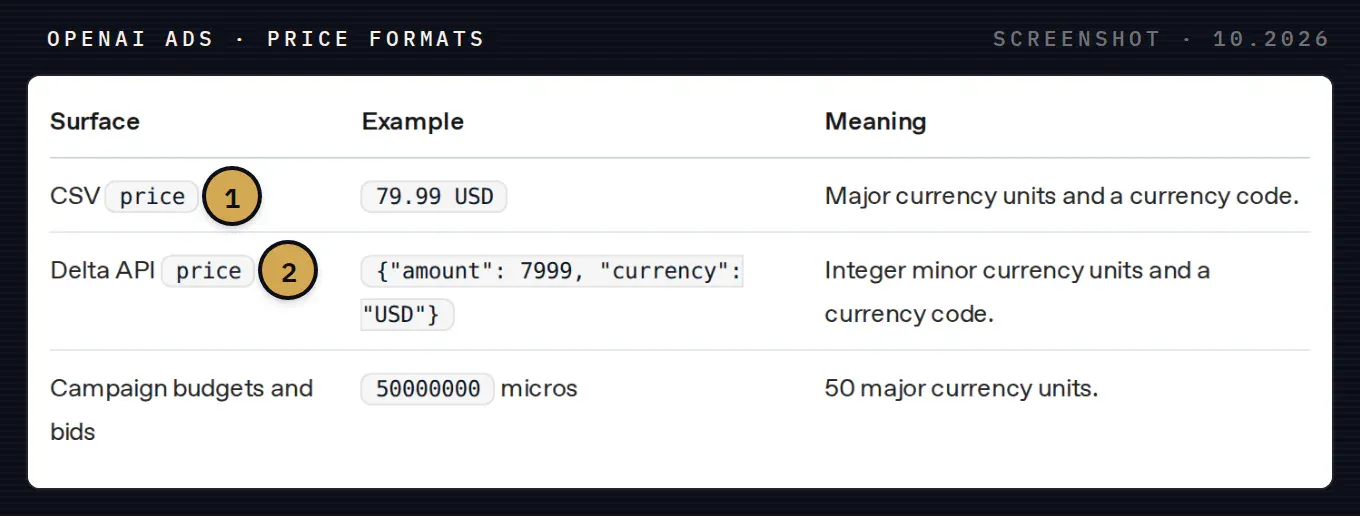
Price formats in the Ads guide. 1 In the CSV, price is 79.99 USD. 2 In the Delta API, the same price is {"amount": 7999, "currency": "USD"} in minor units. Budget micros never go into product prices.
One setting deserves care. With catalog replacement (is_full_refresh) enabled, every full upload must contain every product you want to keep, because OpenAI deletes products missing from it within a day. Source: OpenAI, Ads product feeds
Check the upload before you build campaigns
Each Ads upload ends with a status. A completed upload only means the file was processed: OpenAI notes that product data, availability, filters and campaign eligibility still decide whether a product can serve.
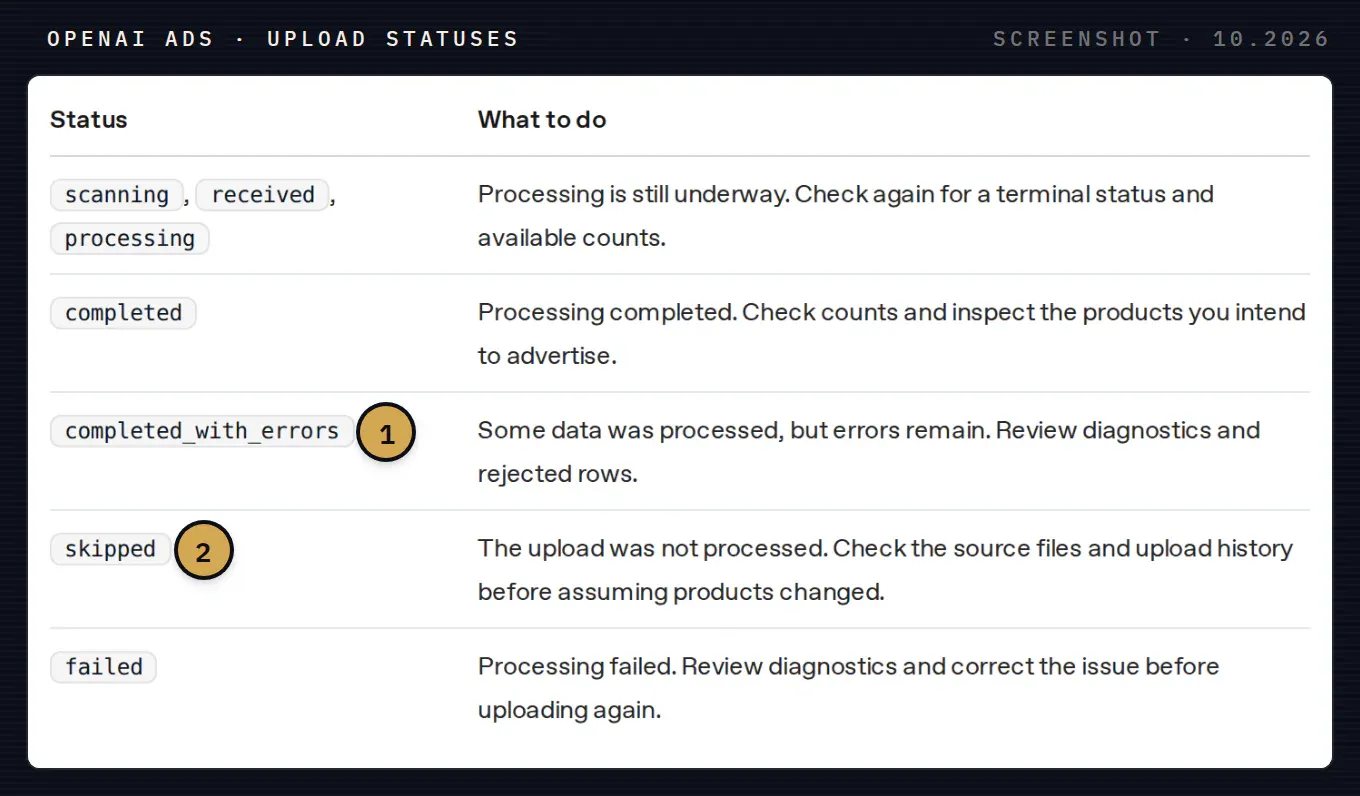
Upload statuses. 1 completed_with_errors: part of the file went in, the rest was rejected; review diagnostics and rejected rows. 2 skipped: nothing was processed, so your products did not change.
The diagnostics name the problem. Two of them cover most first uploads:
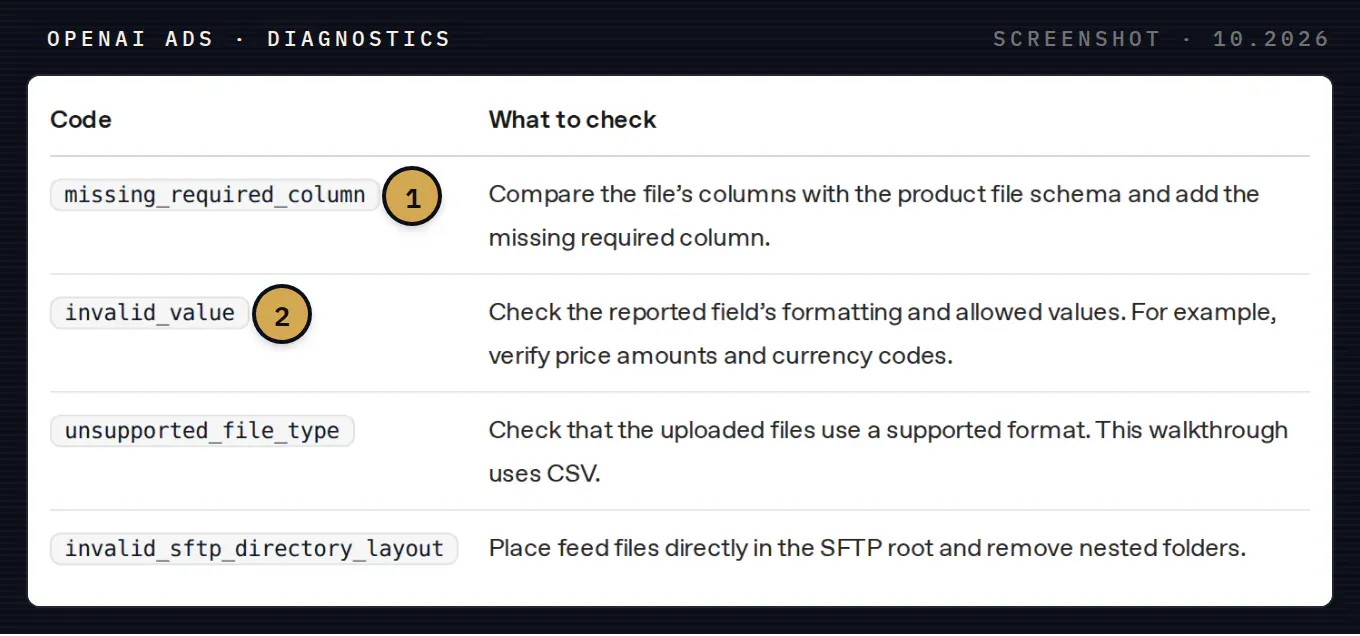
Diagnostic codes. 1 missing_required_column: a required column is absent from the file. 2 invalid_value: a value breaks the format or the allowed list, most often a price or currency code.
Source: OpenAI, Ads product feeds
Coming from a Google Merchant Center feed
Most stores already have a Google Shopping feed, and OpenAI accepts some of its names as legacy aliases: id or sku for item_id, item_group_id for group_id, enable_search and enable_checkout for the two eligibility flags. Source: OpenAI, product feed reference
The values are where a copied feed fails. Check these before the first upload:
- availability values such as
in stockwith a space do not match OpenAI’sin_stock; - booleans must be
trueorfalse, in JSON or as lowercase strings; seller_namehas no Google equivalent, so add it;- descriptions with HTML need to become plain text;
- placeholder values for missing GTINs or brands have to be removed, not filled with
n/a.
What Syntropic does for your feed
For WooCommerce we publish HostedFeed, a free plugin that builds the feed from simple products and variations, refreshes it daily and gives you the Hosted URL for ChatGPT Ads on WooCommerce. For PrestaShop our module shares products, variants, prices and availability with OpenAI Ads on a schedule: see how to connect PrestaShop to ChatGPT Ads. We set up the plugin, map brand, GTIN and stock statuses to the spec, check the first upload and help plan the first product campaign.
If you are still choosing between the organic feed, Shopify’s Agentic plan and ads, start with our comparison of the three routes for WooCommerce. For Shopify stores, our guide to agentic storefronts and Shop MCP covers the per channel settings.
Book a call and bring a product export: we will show you which fields fail OpenAI’s spec and what to fix first.