

If your Shopify store is eligible, AI channels can already find and sell your products: Shopify turns agentic storefronts on by default and manages them for you unless you change the setting. On October 13, 2026 Shopify also opened Shop MCP, which lets any AI agent search Shopify Catalog and build a checkout at your store. You control both from one page in the admin, Sales channels › Agentic.
As of October 14, 2026. Each section links to the primary source.
| AI channel | How the buyer pays | Who can see it | What it needs |
|---|---|---|---|
| ChatGPT | On your online store checkout | Customers in the US | Shopify Catalog eligibility, store policies |
| Google AI Mode and Gemini | Direct checkout in the chat, if on | Store based in the US, US customers | Google Merchant Center via the Google & YouTube channel or a feed provider |
| Microsoft Copilot | Direct checkout in Copilot, if on | Eligible stores | Shopify Catalog eligibility |
| Meta AI and Muse | Direct checkout on Meta surfaces, on by default | Customers in the US, Canada and Mexico | Facebook & Instagram channel with product sync |
| Agents using Shop MCP | Shop Pay checkout or your checkout page | Any MCP-compatible agent | Products in Shopify Catalog |
Source: Shopify Help Center, agentic storefronts, Shopify developer changelog, Shop MCP
If you sell mainly in the US, open the Agentic page this week, check which products are eligible and decide per channel whether you want direct checkout. If you sell elsewhere, most channels will send buyers to your store or not show you at all, so start with catalog data.
What Shopify changed on October 13
Shopify’s developer changelog describes Shop MCP as a way for “your agent or app” to “search Shopify Catalog, build carts, and complete Shop Pay checkout through a single MCP connection”. It runs at mcp.shop.com, gives an agent 17 tools and covers “over 1 billion products in Shopify Catalog”. Search works without an API key. Source: Shopify developer changelog
The announcement is written for developers who build agents. For a merchant it means one thing: the pool of agents that can find your products in Shopify Catalog and send a buyer to your checkout is no longer limited to the big chat apps. A small shopping assistant built by anyone can now do it through the same connection.
How far an agent gets depends on whether the shopper is signed in to Shop:
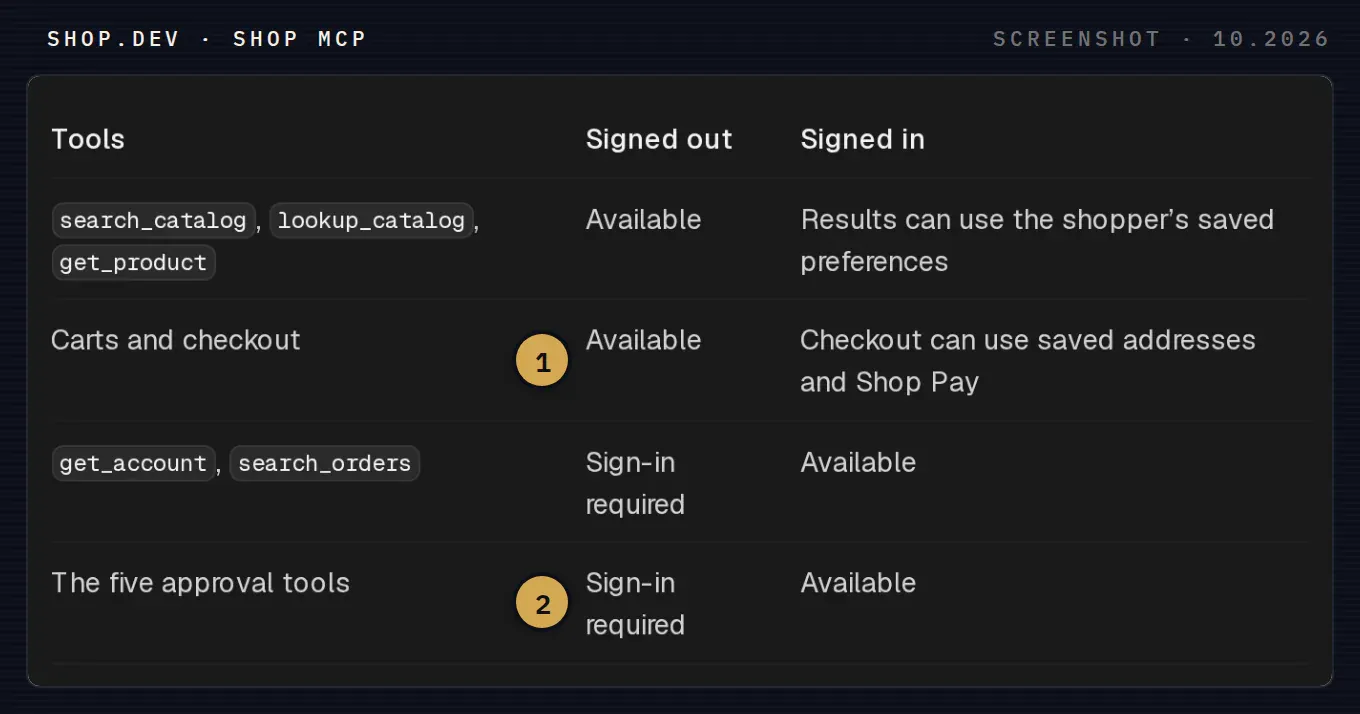
What an agent can do through Shop MCP. 1 Carts and checkout work without a Shop sign-in; the shopper then pays on your checkout page. 2 The approval tools, used when the agent pays on a store that does not run on Shopify, need a signed-in shopper.
With a signed-in shopper, the agent can complete the purchase with saved addresses and Shop Pay, but only “after the shopper confirms the total and payment method”. The Shop skill file that agents read is stricter: a purchase “requires explicit approval of the merchant, items, quantities, current total, and the offered checkout instrument”. Source: shop.dev, Shop MCP, Shop MCP skill
Did Shopify block AI agents at checkout?
Several finance sites ran headlines in early October 2026 saying Shopify blocks autonomous AI agents from merchant checkouts, without linking to a Shopify announcement. Example: Simply Wall St via Webull, October 8, 2026 The rule they describe is older. In July 2025 Shopify added a note to the default robots.txt of its stores saying that “automated scraping, ‘buy-for-me’ agents, or any end-to-end flow that completes payment without a final review step is not permitted”, and pointed integrators to Checkout Kit. Shopify’s Ilya Grigorik said then that the update “doesn’t add or remove any rules for bots or agents”. Source: Modern Retail, July 14, 2025
Read together with Shop MCP, the direction is consistent. Agents are welcome to search your catalog and prepare a checkout through Shopify’s own channels. An agent that scrapes your storefront and pays without the buyer reviewing the order is not.
Where the settings live
Everything sits in Sales channels › Agentic in your Shopify admin. Shopify lists what the page holds: channel access to Shopify Catalog, direct checkout per channel, the number of products in Shopify Catalog, product mapping and variant grouping, a search preview and a performance dashboard. Source: Shopify Help Center, managing agentic storefronts
The switch that matters most is Allow Shopify to manage for me. It is on by default, and Shopify describes its effect in three sentences: “Agentic storefronts have access to your products through Shopify Catalog. Direct checkout is activated for the relevant channels. You’re auto-enrolled in new agentic storefronts.”
Turn it off and you manage each channel yourself, including a separate Auto enroll new storefronts option. That option decides whether your store joins the next AI channel Shopify adds without asking you. Source: Shopify Help Center, managing agentic storefronts
Before any channel goes live, you also have to agree to the Shopify Agentic Storefronts Supplemental Terms of Service and have your terms of service, privacy policy and return and refund policy filled in under Settings › Policies. Read the supplemental terms before you leave direct checkout on, because with it the sale happens inside another company’s app. Source: Shopify Help Center, ChatGPT channel
Check what Shopify Catalog shows about you
AI channels see your store through Shopify Catalog, which Shopify says uses “title, description, options, images, price, availability, and other key attributes”. On the Agentic page, Sources › Shopify Catalog shows the number of eligible products, or an Ineligible warning if your store does not qualify. Click the number to review how your data is mapped. Source: Shopify Help Center, Shopify Catalog and product discovery
The search preview is the fastest test you have. Type the queries your customers use and you see “the raw outputs of Shopify Catalog search”. Shopify warns that each AI platform ranks results its own way, so the preview shows what the catalog returns, not what ChatGPT or Gemini will display. Source: Shopify Help Center, managing agentic storefronts
Shopify’s help pages describe no per-channel product list. To keep a single product out of AI discovery, Shopify’s documented method is setting its status to Unlisted, which also removes it from sitemaps, search engines and your own store search. Source: Shopify Help Center, Shopify Catalog and product discovery
Channel by channel
ChatGPT
Shopify calls ChatGPT “a discovery-focused referrer platform”. The buyer finds your product in ChatGPT and pays on your full online store checkout, in ChatGPT’s in-app browser or in a new tab. The channel needs a store that sells to US customers. B2B-only products are not supported, and products on OpenAI’s prohibited list do not appear. Shopify lists no selling fee for this channel; your usual payment processing fees apply. Source: Shopify Help Center, ChatGPT channel
To leave ChatGPT, turn off Shopify Catalog access in Sales channels › Agentic › ChatGPT. Shopify says it “can take up to 7 days” before your product data stops being shared.
Google AI Mode and Gemini
Here the buyer can pay without leaving the conversation: they click Buy, enter shipping and payment details in the embedded checkout and click Pay now. Your store must be based in the US and sell to US customers, and products come from Google Merchant Center, synced through the Google & YouTube sales channel or a third-party feed provider. Buyers outside the US go to your storefront instead. Direct checkout is a toggle in Sales channels › Agentic › Google AI Mode and Gemini. Source: Shopify Help Center, Google AI Mode and Gemini
Shopify’s page requires a Merchant Center account that meets all of Google’s eligibility rules, so on this channel the state of your Merchant Center feed matters as much as Shopify Catalog. Fix disapproved products there first.
Microsoft Copilot
With direct checkout on, buyers complete the purchase in a Shopify-powered checkout inside Copilot. Shopify’s overview page does not list Copilot-specific requirements beyond Shopify Catalog eligibility and the supplemental terms. Source: Shopify Help Center, Microsoft Copilot
Meta AI and Muse
Buyers pay in a Shopify-powered checkout “on Meta surfaces, including Muse when available”. It needs customers in the US, Canada or Mexico and the Facebook & Instagram by Meta sales channel with product syncing on. Direct checkout is on by default for eligible stores; to change it, turn off Allow Shopify to manage for me, open Meta AI and Muse and switch Direct checkout. Source: Shopify Help Center, Meta channel
Direct checkout: on or off?
Direct checkout trades control for fewer steps. The buyer never sees your store, your upsells or your post-purchase pages, and your support team gets an order that started in a chat window. Leaving it off sends the buyer to your checkout, with one more click before the sale.
- Turn it on for products that sell on price and availability: replenishment items, simple products with one or two variants, items where your checkout adds nothing.
- Leave it off where the sale needs your store: configurable products, bundles, made-to-order items, anything with a sizing guide or a fitting step.
- Turn off auto-enrollment if you sell regulated or age-restricted products, so a new channel does not go live before you have read its rules.
Measure before you widen anything
Shopify says orders from AI channels show up in your admin “with channel or referrer attribution”, and the Agentic page reports sales, orders, referral sessions and conversion rate, calculated as sessions that completed checkout divided by sessions. Source: Shopify Help Center, agentic storefronts
Check those numbers against your own analytics once a month. A channel that sends sessions but no orders usually points to catalog data: wrong availability, missing variant images or titles that do not match how people ask.
Not on Shopify?
Stores on WooCommerce or another platform can list products in Shopify Catalog through Shopify’s Agentic plan, without running a Shopify online store. We compared that route with OpenAI’s merchant feed and ChatGPT Ads in our guide for WooCommerce stores.
How Syntropic helps
Our agentic commerce work starts where these settings end: we review your Shopify Catalog data and Merchant Center feed, decide with you which channels get direct checkout, and set up tracking so AI orders are visible next to your other channels. When you want an assistant of your own on top of the catalog, see how we approach product search for AI assistants.
Book a call with access to your Shopify admin, and we will go through the Agentic page with you channel by channel.