

Shopify’s official MCP server for Claude Code is the Dev MCP server (@shopify/dev-mcp), part of the Shopify AI Toolkit. You add it with one command, it runs on your machine without logging in, and it gives Claude Shopify’s documentation, API schemas and a validator for GraphQL and Liquid. It does not read your store: queries against store data go through Shopify CLI, shopify store auth and then shopify store execute, which is read-only unless you pass --allow-mutations.
As of November 7, 2026, Dev MCP server version 1.18.0. We ran it, asked for a weekly sales-by-channel report and show below what it accepted, what it rejected and where it sent us to a field Shopify has already deprecated.
| You want | Use | Login | Store data |
|---|---|---|---|
| Claude Code writes and checks Shopify queries, Liquid and app code | Dev MCP server or the AI Toolkit plugin | None | No |
| Run a query on your store from the terminal | Shopify CLI: shopify store auth, shopify store execute | Browser login, scopes you choose | Yes, read-only by default |
| Ask about orders, stock and sales in the Claude app, in chat | Shopify connector for Claude | Approval in the Shopify admin, staff account permissions | Yes: reads orders and analytics, writes products, stock and discounts |
| A shopper’s AI agent searches your catalog and checks out | Shop MCP and Shopify Catalog | Set by Shopify | Public catalog |
The connector is Shopify’s route for chat: you install it from Claude’s connector directory, approve access in the Shopify admin, and it acts with the permissions of that staff account. It cannot issue refunds, cancel or capture orders or mark them as paid. Source: Shopify Help Center, Shopify connector for Claude For code you keep in a repository and run every week, the Dev MCP server and Shopify CLI are the pieces this article is about.
The last row is a different job: what shopping agents see of your store. We cover it in Shopify Agentic Storefronts and Shop MCP. This article is for the person who connects Claude Code to Shopify to build reports and integrations.
Plugin or MCP server
Shopify offers two ways into Claude Code. Its documentation calls the plugin “the recommended way to install the AI Toolkit” because it “bundles everything into a single install and updates automatically”. Source: Shopify AI Toolkit
claude plugin install shopify-ai-toolkit@claude-plugins-official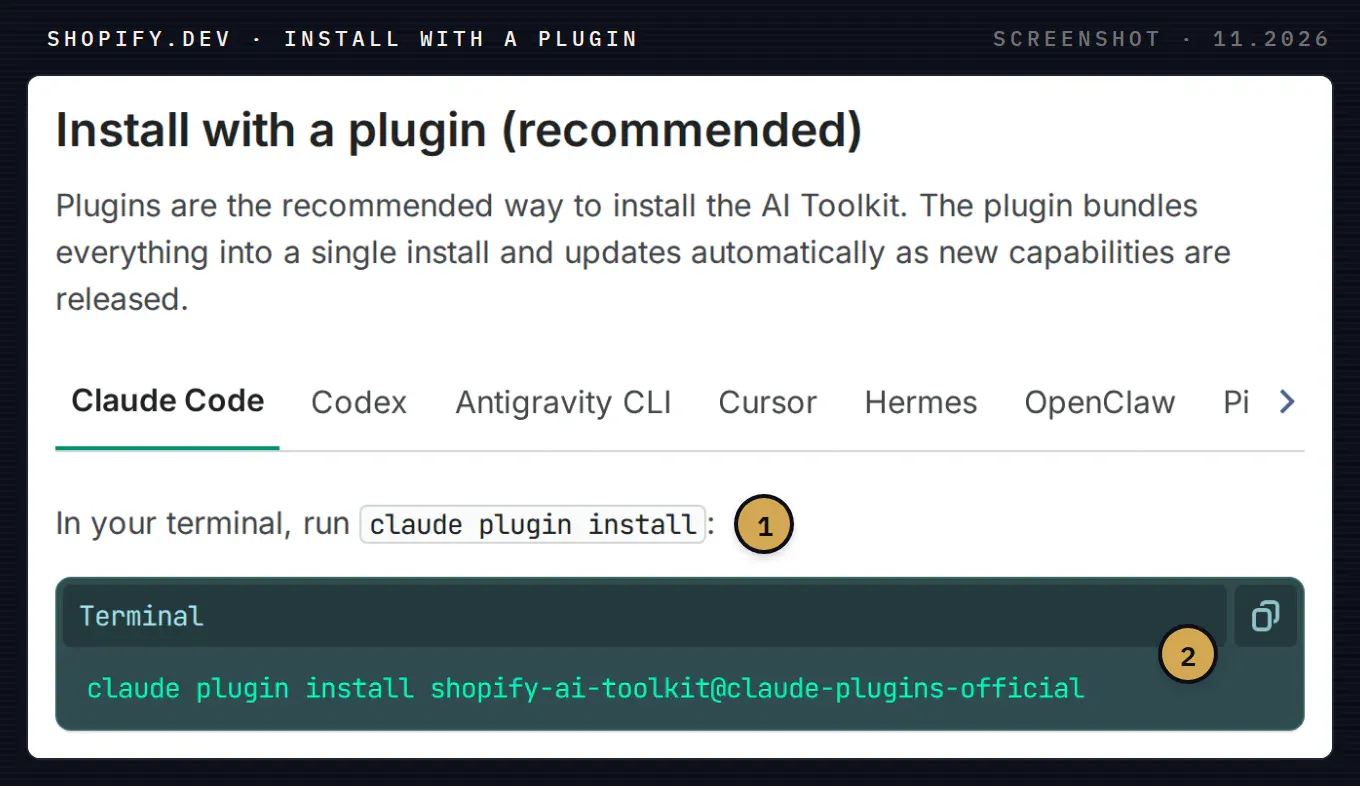
Install with a plugin, Claude Code tab. 1 Claude Code installs it with its own claude plugin install command. 2 The plugin name in the official Claude plugin directory.
The plugin adds a single shopify skill that covers the GraphQL Admin API, Functions, Polaris, Liquid, Hydrogen and Shopify CLI. If you prefer to see and control each tool, add only the MCP server:
claude mcp add --transport stdio shopify-dev-mcp -- npx -y @shopify/dev-mcp@latest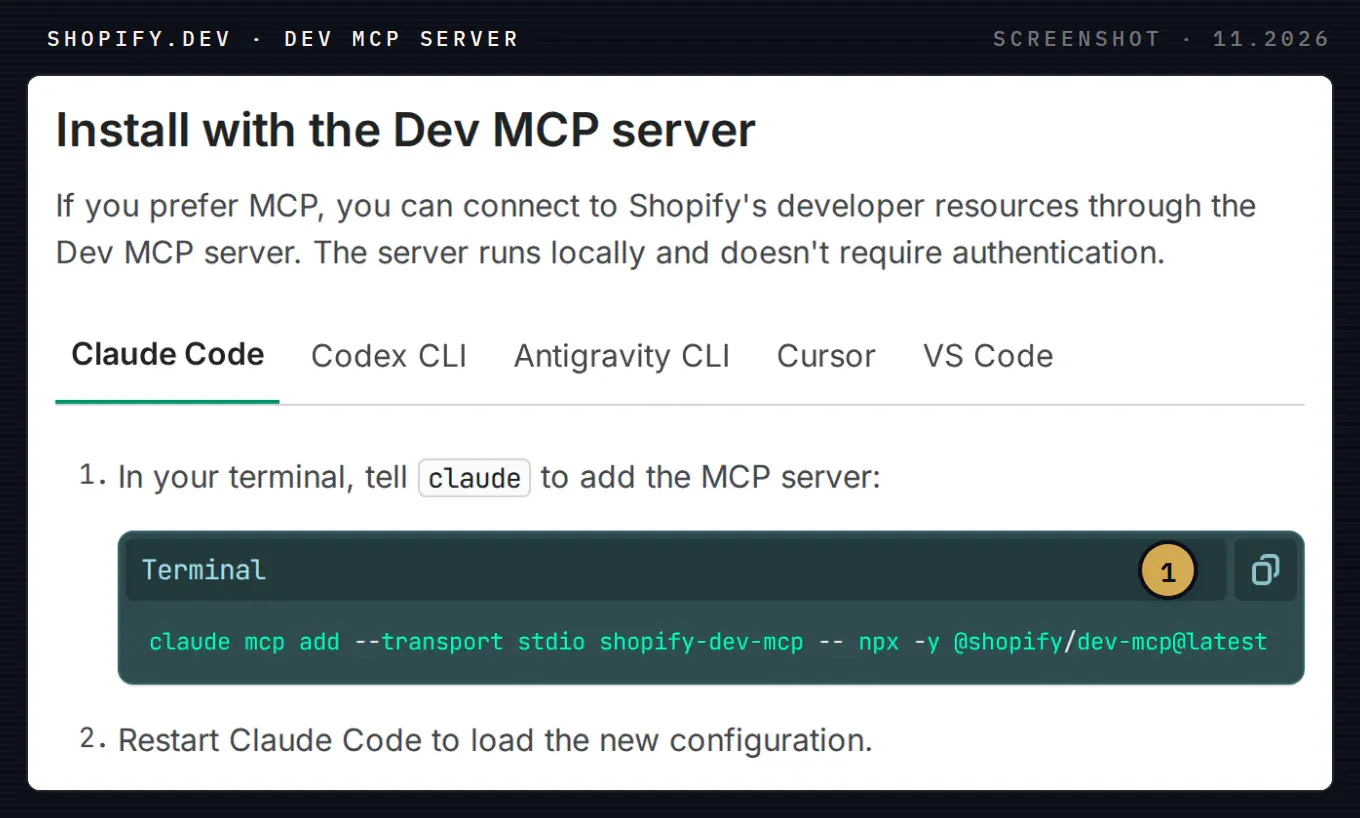
Install with the Dev MCP server. 1 The whole setup for Claude Code is this one line, then a restart. Requirement: Node.js 18 or newer.
Our choice for a reporting or integration project is the MCP server. It is one process with five tools you can list, and nothing in it can touch a store.
What the Dev MCP server gives Claude
We started the server the way Claude Code does (npx -y @shopify/dev-mcp@latest, stdio) and listed its tools. Version 1.18.0 returned five:
| Tool | What it does |
|---|---|
learn_shopify_api | Must be called first. Loads instructions for one API (Admin, ShopifyQL, Storefront, Functions, Liquid, CLI and others) and returns a conversationId that every other call needs |
search_docs_chunks | Searches shopify.dev and returns fragments with links, for a given API and version |
validate | Checks GraphQL operations and UI components against the bundled schema. Returns VALID, INVALID or valid with warnings, plus the scopes the operation needs |
validate_theme | Checks Liquid and theme files in a theme directory |
feedback | Asks the agent to grade the toolkit once per turn |
The default API version in our run was 2026-10. You can pin another one when your app targets an older version.
Our test: sales by channel for last week
The question a developer at a store gets every Monday: how much did we sell last week, per channel, compared with the week before. We asked for it the way you would type it into Claude Code and called the tools in the order the server prescribes.
Step 1: the first draft fails validation
A model writing from memory tends to produce something like this. We sent it to validate as is:
query LastWeekOrders {
  orders(first: 250, query: "created_at:>=2026-10-31") {
    edges {
      node {
        name
        createdAt
        salesChannel
        totalPrice
        netSales
      }
    }
  }
}
The response, unchanged:
Overall Status: ❌ INVALID
GraphQL validation errors: Cannot query field "salesChannel" on type "Order".
Did you mean "channel"?; Cannot query field "netSales" on type "Order".
Version validated against is 2026-10.
Two invented fields caught before anything reached a store. This is the main value of the server: the agent checks itself against the real schema instead of guessing.
Step 2: the hint points at a deprecated field
We followed the hint and replaced salesChannel with channel. The query passed, with a warning:
Overall Status: ⚠️ VALID (with warnings)
Note: The field Order.totalPrice is deprecated. Use `totalPriceSet` instead.;
The field Order.channel is deprecated. Use `publication` instead.
The next attempt, channelInformation { channelDefinition { channelName } }, was also accepted with warnings: all three fields are deprecated, and Shopify points to Order.attribution and orderAttributionDefinitions. The version that passed clean:
query LastWeekOrders($cursor: String) {
  orders(first: 250, after: $cursor, query: "created_at:>=2026-10-26 AND created_at:<2026-11-02") {
    pageInfo { hasNextPage endCursor }
    nodes {
      name
      createdAt
      cancelledAt
      attribution { displayName handle }
      currentTotalPriceSet { shopMoney { amount currencyCode } }
    }
  }
}
Overall Status: ✅ VALID
Required scopes: read_orders, read_marketplace_orders, read_buyer_membership_orders, read_quick_saleThe list of required scopes is useful on its own: it is exactly what you will be asked to grant in the next step.
Step 3: totals belong to ShopifyQL
The orders query gives you rows. Net sales per channel is an aggregate, and the server’s own ShopifyQL instructions say so directly: ShopifyQL is “Shopify’s query language for aggregated store metrics… that the Admin GraphQL API cannot compute”. We loaded that API, searched the docs for the sales schema and the COMPARE TO clause, and wrapped the query in the Admin API field shopifyqlQuery:
query {
  shopifyqlQuery(query: """
    FROM sales
    SHOW net_sales, orders
    GROUP BY sales_channel
    DURING last_week
    COMPARE TO previous_period
  """) {
    tableData { columns { name dataType } rows }
    parseErrors
  }
}
validate returned VALID with one required scope, read_reports. Shopify’s reference for shopifyqlQuery adds a second condition: level 2 access to protected customer data (name, address, phone, email). Source: shopifyqlQuery, ShopifyQL COMPARE TO
What we noticed
- “Did you mean” is not a recommendation. The validator suggested
channel, which Shopify had already deprecated. Read the warnings in a VALID result as carefully as the errors in an INVALID one. - Validate against your app’s API version. We validated against 2026-10, the server’s default. If your app still calls an older version, pass that version to
validate: a replacement field the warning recommends may not exist there yet. - The ShopifyQL inside the wrapper is not checked.
validateconfirms the GraphQL around it. TheFROM ... SHOW ...body is only proven by running it: a mistake comes back inparseErrors. The server’s instructions say the same. We had no store connected in this test, so the ShopifyQL above is validated as GraphQL and built from names in the docs, not run. - Net sales is not an order field. If Claude starts summing
currentTotalPriceSetacross orders and calls it net sales, it is mixing returns, taxes and shipping into one number. Use ShopifyQL for the report and the orders list for checking individual cases. - The tools ask for your prompt. The description of
learn_shopify_apiasks the agent to pass “the user’s most recent message, verbatim” and the model name. Shopify’s README says published builds send usage events tohttps://shopify.dev/mcp/usage, which “can include tool inputs and results”.
Before anyone pastes a customer name or an order number into a prompt, switch the telemetry off. Shopify’s recommended way is an empty opt-out file; setting OPT_OUT_INSTRUMENTATION=true or DO_NOT_TRACK=1 in the environment that starts the server works too. Source: @shopify/dev-mcp README
mkdir -p ~/.config/shopify-ai-toolkit
touch ~/.config/shopify-ai-toolkit/opt-out
Running the query on your store
Shopify CLI does the part the MCP server does not: it logs in to a store and runs a query there. The AI Toolkit page describes it as store management “through Shopify CLI’s authenticated store context, with you choosing when to execute them”. Source: Shopify AI Toolkit
npm install -g @shopify/cli@latest

shopify store auth --store your-store.myshopify.com --scopes read_reports

shopify store execute --store your-store.myshopify.com \
  --query-file sales-by-channel.graphql --json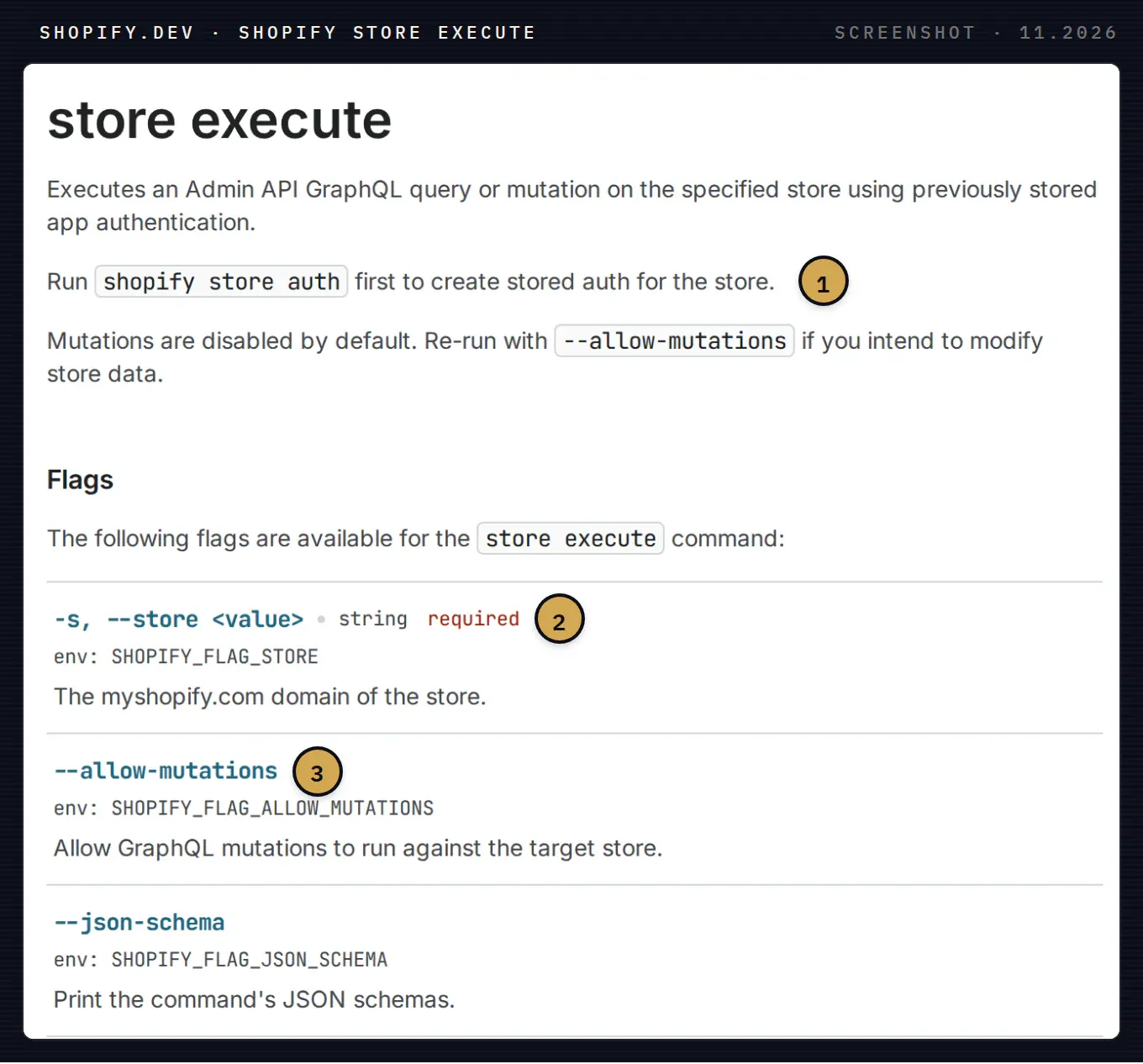
shopify store execute on shopify.dev. 1 Authorise the store first with shopify store auth; it stores an online access token for later use. 2 --store takes the myshopify.com domain and is required. 3 Mutations only run with --allow-mutations. A report never needs it.
The CLI instructions bundled with the server also tell the agent to show you the exact command, the target store and the data it will send before running anything that logs in, requests scopes or runs a mutation, and to wait for your confirmation in a separate turn. In Claude Code that means you see shopify store auth before it opens the browser.
We stopped at this step: the test had no store attached, so the commands above follow Shopify’s documentation rather than our own output. Source: store execute, store auth
Limits that decide how you write the query
Rate limits are counted in points, not requests. Every field has a cost, and each app and store pair gets a refill rate that depends on the store’s plan. A single query may not exceed 1,000 points on any plan, and connections are costed by their first argument. Source: GraphQL Admin API rate limits
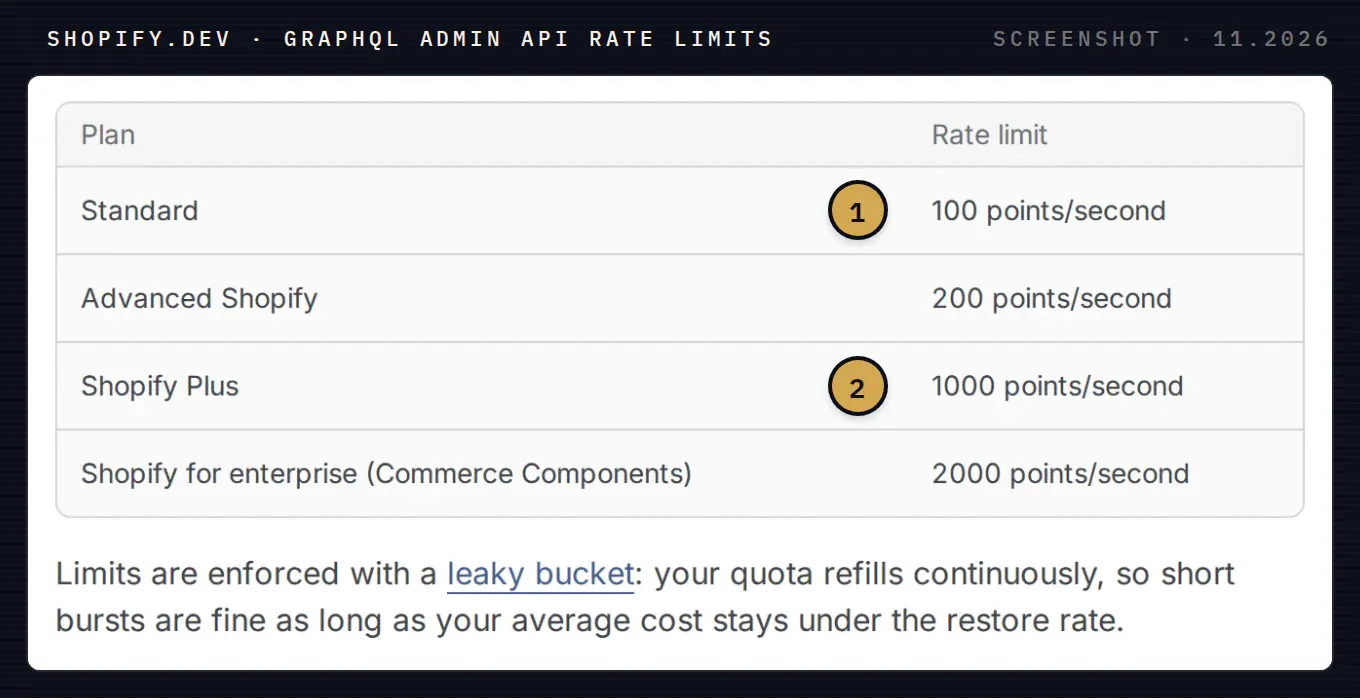
Rate limit by plan. 1 A standard plan refills 100 points per second. 2 Shopify Plus refills ten times faster. The bucket allows short bursts as long as the average stays under the refill rate.
In practice: a page of 250 orders with nested objects is costed as if all 250 come back, so it can get close to the 1,000-point cap. Check extensions.cost.requestedQueryCost in the first response and lower first if it is high. The header Shopify-GraphQL-Cost-Debug=1 breaks the cost down per field.
Orders older than 60 days need an extra scope. read_orders covers the last 60 days. A year-on-year comparison from order rows needs read_all_orders as well, and Shopify says it restricts that scope for apps without a legitimate use for the data. Source: access scopes
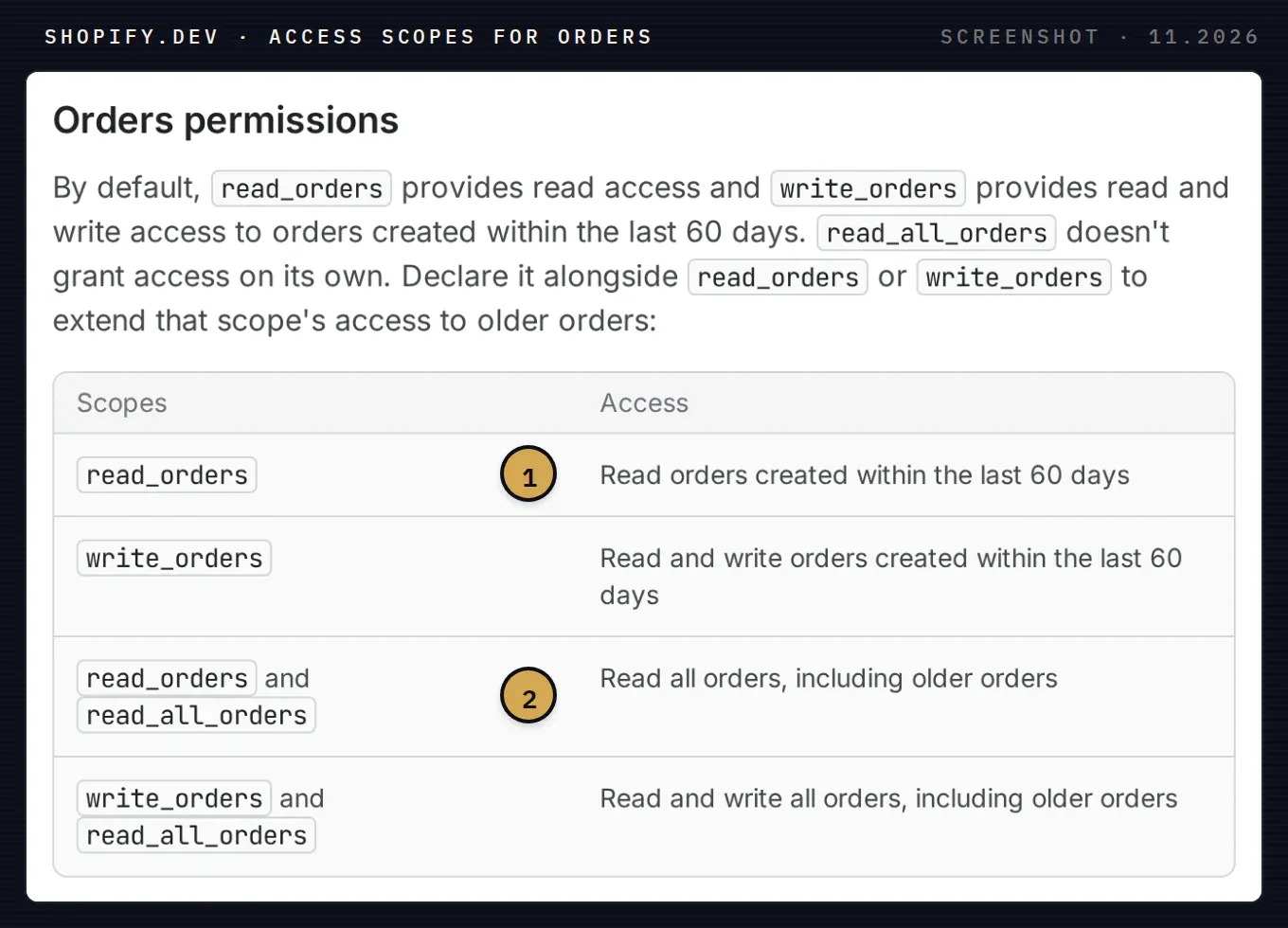
Order scopes on shopify.dev. 1 read_orders alone stops at 60 days. 2 Older orders need read_all_orders next to it.
ShopifyQL reads from read_reports, so the weekly report above does not depend on that 60-day window.
Where it gets hard
The commands are short. The slow part is usually outside them: who owns the app that holds the scopes, whether protected customer data access is approved for it, and whether Shopify’s channel names match the ones your team uses in the ERP or in Power BI. If that is where you are stuck, write which step stopped you and the error. We reply with what to change.
Syntropic builds this kind of connection as part of our agentic commerce and integration work: reports from Shopify into a sheet, BigQuery or Power BI, checked against the numbers in the Shopify admin, and agents that use official APIs with read-only access unless you decide otherwise. For the other side of MCP, what shopping agents can do with your catalog, see Shopify Agentic Storefronts and Shop MCP, and if your catalog also has to reach ChatGPT, the ChatGPT product feed spec.